

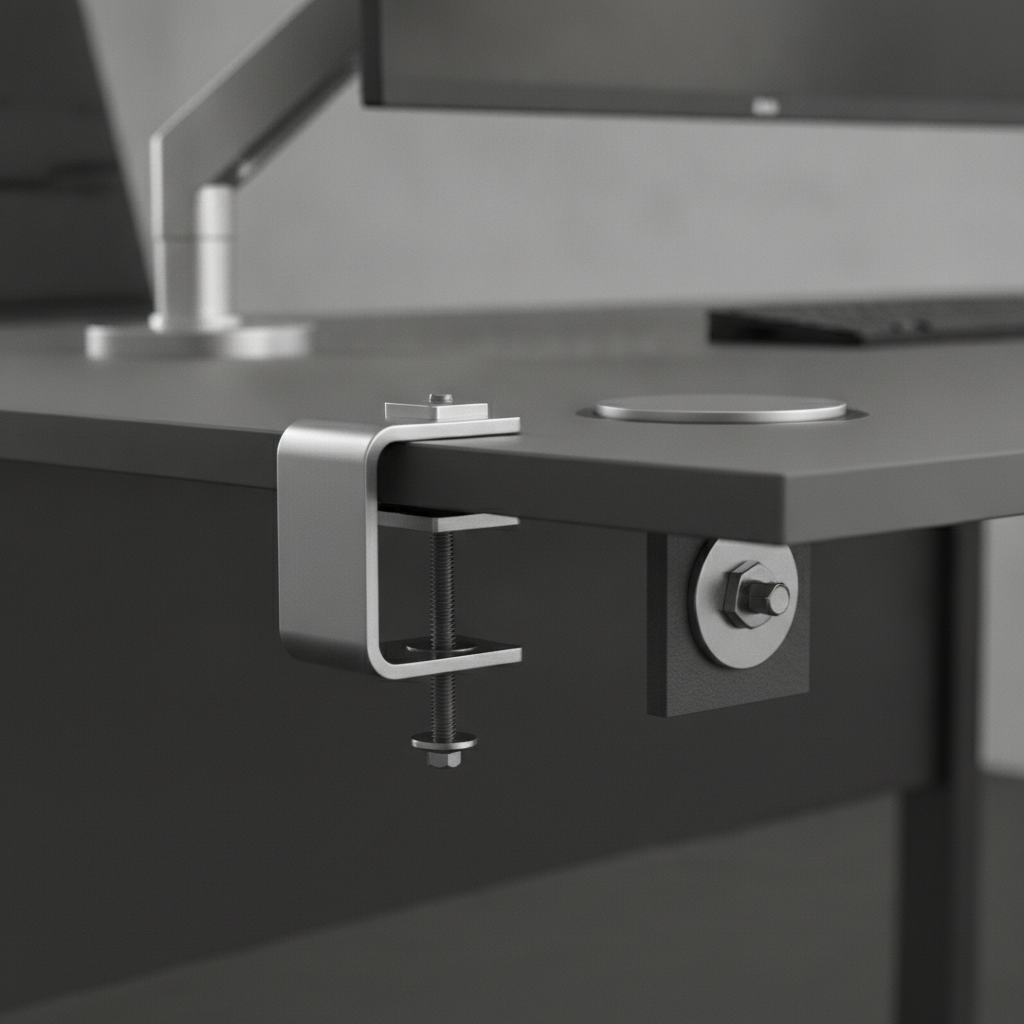
Choosing the right base for your monitor arm matters more than most people realize. The mount type affects stability, desk compatibility, and long-term usability. Whether you pick a monitor arm clamp or a grommet mount depends on your desk type, monitor weight, and how permanent you want your setup to be.
This guide breaks down every difference between clamp mount and grommet mount systems. You will find clear data, real-world use cases, and actionable tips to make the right choice for your workspace in 2026.
Quick Verdict: Clamp Mount vs Grommet Mount — Which Should You Choose?
Not everyone has time to read the full comparison. Here is the short answer for most common situations.
Best Overall Choice for Most Desks
A clamp mount wins for most users. It installs in under 10 minutes. It requires no drilling. It works on nearly any desk with a flat edge. For single or dual monitor setups under 20 lbs per screen, a clamp mount delivers excellent stability at a lower cost. Most monitor arms on the market include a clamp base as the default option.
Best for Renters and Temporary Setups
The monitor arm clamp is the clear winner here. It leaves no permanent marks on your desk. You can remove it in seconds and take it with you when you move. Grommet mounts require a drilled hole, which most landlords consider damage. If you value flexibility, always choose a clamp.
Best for Heavy Monitors and Multi-Screen Setups
A grommet mount takes this category. Bolt-through mounting distributes weight directly through the desk surface. It handles monitors over 20 lbs with ease. Triple-screen setups and large ultrawides benefit from the rigid connection. If your total monitor weight exceeds 35 lbs, go with a grommet mount for safety and stability.
What Is a Clamp Mount for Monitor Arms?
A clamp mount uses a C-shaped mechanism that grips the edge of your desk. It is the most common base type found on monitor arms sold today. The design is simple, effective, and non-destructive.
How Clamp Mounts Attach to Your Desk
The clamp base has two contact points. The upper jaw rests on top of the desk edge. The lower jaw presses against the underside. A tightening screw or bolt draws the two jaws together. This creates a firm grip through friction and pressure. Most clamps include rubber or foam pads on both jaws to protect the desk surface and improve grip.
Key Features of C-Clamp Monitor Arm Bases
- Adjustable width: Most clamps accommodate desk thicknesses from 0.5 inches to 3.5 inches
- Tool-free options: Some models use a hand-tightened knob instead of a bolt
- Protective padding: Non-slip rubber pads prevent scratches and slipping
- 360-degree rotation: The base often allows the arm to swivel freely
- Weight capacity: Typically rated for 15 to 30 lbs depending on the model
- Quick release: Most clamps can be loosened and removed in under a minute
Pros and Cons of Clamp Mounts
| Pros | Cons |
|---|---|
| No drilling or permanent modification required | Limited by desk edge thickness (max ~3.5″) |
| Fast installation (5–10 minutes) | Can slip on very smooth or curved desk edges |
| Easily removable and repositionable | May leave indentations on soft wood over time |
| Works on most desk types and materials | Less stable than grommet for very heavy loads |
| No special tools needed | Edge lip or raised lip desks may not fit |
| Generally less expensive | Can interfere with desk edge drawers or trays |
What Is a Grommet Mount for Monitor Arms?
A grommet mount passes a bolt through a pre-existing hole in your desk. The hole is often called a grommet hole. These holes are common on office desks and standing desks. The bolt secures the arm base directly to the desktop surface from below.
How Grommet Mounts Work Through Desk Holes
You feed the mounting bolt through the grommet hole from above. Underneath the desk, a washer and nut secure the bolt. Tightening the nut pulls the arm base flush against the desktop. This creates a direct mechanical connection. The desk itself becomes part of the mounting structure. Standard grommet holes measure 2 inches to 2.5 inches in diameter. Some arms require a specific hole size, so check the specifications before purchasing.
Key Features of Bolt-Through Monitor Arm Bases
- Direct bolt connection: The arm base sits flat on the desk surface with no gap
- Reinforcement plates: Many kits include a metal plate that spreads load on softer desks
- Higher weight capacity: Typically rated for 20 to 45+ lbs
- No edge dependency: Works regardless of desk edge shape or thickness
- Permanent installation: Requires a hole, which is a lasting modification
- Low profile: The base sits closer to the desk, freeing up under-desk space
Pros and Cons of Grommet Mounts
| Pros | Cons |
|---|---|
| Superior stability for heavy monitors | Requires a pre-drilled or existing hole |
| No pressure on desk edges | Permanent modification (not renter-friendly) |
| Higher weight capacity (20–45+ lbs) | Longer installation time (15–30 minutes) |
| Cleaner look with hidden hardware | Drilling a new hole requires tools and skill |
| Does not interfere with desk edge accessories | Hole placement limits arm positioning options |
| Better long-term durability with no loosening | Not all desks have suitable grommet holes |
Monitor Arm Clamp vs Grommet Mount: Head-to-Head Comparison
Let us compare these two mounting methods across the factors that matter most for your daily use.
Installation Difficulty and Time Required
A clamp mount wins on ease of installation. You position the base on the desk edge, tighten the bolt, and you are done. Total time: 5 to 10 minutes. No tools required in most cases.
A grommet mount takes more effort. If your desk already has a grommet hole, installation takes 10 to 15 minutes. If you need to drill a new hole, expect 20 to 30 minutes plus the right drill bit. You will need a power drill and possibly a hole saw attachment.
Stability and Rigidity Under Load
The grommet mount provides noticeably better stability. The bolt-through design creates a rigid connection that resists wobble and vibration. When you type heavily or bump your desk, a grommet-mounted arm stays put.
A monitor arm clamp is stable for most setups. But under heavy loads (30+ lbs) or on thin desks, you may notice slight movement. The clamp relies on friction, which can degrade over time if not properly tightened.
Desk Compatibility and Thickness Limits
Clamp mounts work on desks between 0.5 inches and 3.5 inches thick. Most standard desks fall within this range. However, desks with beveled edges, raised lips, or uneven undersides may not provide a secure grip.
Grommet mounts have no thickness limitation. The bolt passes through the desk regardless of how thick it is. The only requirement is a hole of the correct diameter. This makes grommet mounts ideal for thick butcher block desks or custom surfaces.
Reversibility and Desk Damage
Clamp mounts are fully reversible. Remove the clamp, and your desk looks the same. The only potential issue is slight compression marks on soft wood surfaces after months of use. These usually fade or can be sanded out.
Grommet mounts are permanent. The hole stays whether you use the arm or not. If you sell your desk or move offices, the hole remains. This is a significant consideration for rented spaces or shared offices.
Aesthetics and Cable Management
Grommet mounts offer a cleaner look. The base sits flush on the desk, and cables can route through the same grommet hole. This hides hardware and reduces visual clutter.
Clamp mounts have a visible base on the desk edge. This is not unattractive, but it is more noticeable. Cable management is still possible, but cables must route around the clamp base to reach the desk surface.
Long-Term Durability and Maintenance
Grommet mounts require almost no maintenance. Once tightened, the bolt stays secure for years. Metal-on-metal connections do not loosen from vibration the way friction-based clamps can.
Clamp mounts may need occasional re-tightening. Changes in humidity and temperature can cause wood desks to expand or contract slightly. Check your clamp every few months and tighten if needed. Replace the rubber pads if they become compressed or worn.
Desk Compatibility Guide: Clamp Mount vs Grommet Mount by Desk Type
Not all desks work equally well with both mounting types. Here is a detailed breakdown by desk material and design.
Solid Wood and Laminate Desks
Both clamp mounts and grommet mounts work well on solid wood and laminate desks. These surfaces provide a firm, flat edge for clamps. They also hold bolts securely through grommet holes. For desks thicker than 2 inches, a grommet mount offers better load distribution. For standard 1 to 1.5-inch desks, either option performs well.
Glass Desks and Tempered Surfaces
Use extreme caution with glass desks. A clamp mount is the only viable option. Never drill a hole in tempered glass. The clamp must use extra-thick protective pads to distribute pressure evenly. Check the glass manufacturer’s weight limit before mounting any arm. Most glass desk manufacturers void the warranty if you attach a monitor arm.
Hollow-Core and Honeycomb Desks
This is where the choice matters most. Clamp mounts can crush hollow-core edges if over-tightened. The internal honeycomb structure cannot handle concentrated pressure. A grommet mount with a reinforcement plate is strongly recommended. The plate spreads the load across a wider area of the desktop surface. Without reinforcement, the bolt can pull through the thin top layer.
Bamboo and Composite Desktops
Bamboo desks are dense and strong. Both clamp and grommet mounts work well. However, bamboo can crack if you drill a grommet hole too close to the edge. Keep the hole at least 3 inches from any edge. Composite desktops (MDF, particleboard) work with both types but are softer. Use wider reinforcement plates with grommet mounts to prevent pull-through.
Standing Desks and Sit-Stand Setups
Most electric standing desks come with pre-drilled grommet holes. This makes grommet mounting the natural choice. However, many standing desk users prefer clamp mounts for flexibility. You can reposition the arm as you adjust desk height. If your standing desk has a thick frame or crossbar near the edge, a clamp may not fit. Check the under-desk clearance before choosing.
Desks With Cable Trays, Modesty Panels, or Drawers
These features often block clamp mount placement. Cable trays mounted under the desk edge leave no room for the lower clamp jaw. Modesty panels and pedestal drawers create the same problem. In these cases, a grommet mount is the better choice. The bolt passes through the desktop surface away from obstructions. If you must use a clamp, look for models with extended-reach jaws designed for thick setups.
The Desk Inspection Checklist: How to Choose Between Clamp and Grommet
Before you buy a monitor arm, inspect your desk. These four checks will tell you which mount type works best.
Measuring Desk Edge Thickness and Clearance
Use a ruler or caliper to measure your desk edge thickness. Most clamp mounts support 0.5 inches to 3.5 inches. If your desk is thicker than 3.5 inches, you need a grommet mount or a specialized extra-thick clamp. Also measure the flat area on the desk edge. Some desks have beveled or rounded edges that reduce the contact area for clamps. You need at least 1 inch of flat surface for a secure grip.
Checking for Obstructions Underneath Your Desk
Look under your desk edge. Is there a cable tray, drawer, crossbar, or modesty panel within 4 inches of the edge? If yes, a standard clamp will not fit. You would need a grommet mount or a clamp with an extended lower jaw. Also check the underside for wiring, power strips, or other equipment that could block the clamp bolt.
Identifying Existing Grommet Holes
Look at your desktop surface. Many office and standing desks have one or more pre-drilled holes. These are usually 2 inches to 2.5 inches in diameter and located near the back edge. If you have a suitable hole, a grommet mount becomes an easy option. Measure the hole diameter and compare it to the monitor arm’s bolt size. Some arms include adapter rings for different hole sizes.
Assessing Desk Material Strength
Tap on your desktop. A solid sound means solid wood or dense composite. A hollow sound means honeycomb or hollow-core construction. For hollow desks, always use reinforcement plates with a grommet mount. For clamp mounts on hollow desks, place a small wood block between the clamp jaw and the desk edge to spread pressure. Never over-tighten a clamp on a hollow-core desk.
Monitor Arm Clamp vs Grommet Mount for Specific Use Cases
Your specific setup determines the best mounting choice. Here are recommendations for the most common scenarios.
Single Monitor Setups (24–32 Inches)
For a single monitor in this size range, a clamp mount is the best choice for most users. These monitors typically weigh 8 to 18 lbs, well within clamp capacity. The clamp offers easy installation and full flexibility. A grommet mount works too, but the extra effort is unnecessary for this weight class.
Dual Monitor and Ultrawide Setups
Dual monitor setups add 20 to 40 lbs of total weight. Large ultrawides (38 inches and above) can weigh 25 to 35 lbs alone. For dual setups, a grommet mount provides better long-term stability. For ultrawides over 30 lbs, a grommet mount is strongly recommended. The bolt-through connection prevents the arm from slowly sagging under constant heavy load.
Heavy Monitors Over 20 lbs
Professional-grade displays, large creative monitors, and some TVs exceed 20 lbs. A grommet mount is the safe choice here. The direct bolt connection handles dynamic loads better. When you adjust a heavy monitor’s position, a clamp mount can shift slightly. A grommet mount stays fixed. Always check the arm’s rated capacity and add a 20% safety margin.
Home Office and Remote Work Setups
Home office setups often change over time. You may move to a new desk, add monitors, or rearrange your space. A clamp mount offers the flexibility that remote workers need. It moves with you from desk to desk. If your home desk is permanent and you want maximum stability, a grommet mount is a solid long-term investment.
Gaming Desk Setups
Gaming setups vary widely. A single 27-inch gaming monitor works fine with a clamp mount. Multi-monitor gaming rigs with three or more screens benefit from a grommet mount. Also consider desk vibration. Intense gaming sessions with keyboard and mouse use can cause slight desk movement. A grommet mount resists this better than a clamp.
Office and Commercial Environments
In commercial settings, durability and low maintenance matter most. A grommet mount is preferred. It stays secure for years without re-tightening. IT departments appreciate the permanent installation. Employees cannot accidentally loosen or remove the arm. Many office desks come with pre-drilled grommet holes, making installation straightforward.
Installation Tips for Clamp Mount Monitor Arms
Proper installation ensures safety and longevity. Follow these tips for your clamp mount setup.
Proper Clamp Placement and Tightening
Position the clamp on the flattest section of your desk edge. Avoid beveled or curved areas. Leave at least 2 inches of clearance from any desk corner. Tighten the clamp bolt gradually and evenly. Alternate between the top and bottom bolts if your clamp has two. The clamp should feel solid with zero movement when you push on it. Do not over-tighten, especially on soft wood or composite desks.
Using Protective Pads to Prevent Desk Damage
Always use the rubber or foam pads that come with your clamp. These protect the desk finish and improve grip. If your arm did not include pads, buy adhesive rubber sheets and cut them to size. Replace pads every 12 to 18 months as they compress and lose effectiveness. For soft wood desks, consider adding a thin wood shim between the pad and the desk to further distribute pressure.
Troubleshooting Common Clamp Mount Issues
- Clamp slips over time: Clean the desk edge and clamp pads with isopropyl alcohol. Re-tighten the bolt. Add a thin layer of non-slip shelf liner between the pad and desk.
- Clamp does not fit the desk thickness: Check the arm’s specified range. Some clamps offer extension kits for thicker desks. If your desk exceeds the maximum, switch to a grommet mount.
- Desk edge shows indentations: Loosen the clamp slightly. Add wider protective pads or a wood shim. Sand and refinish the affected area if needed.
- Arm wobbles at the base: The clamp is not tight enough or the desk edge is uneven. Re-position on a flatter section and re-tighten.
Installation Tips for Grommet Mount Monitor Arms
A grommet mount requires more care during installation. These tips will help you get it right the first time.
Choosing the Right Hole Location and Diameter
Place the grommet hole where the monitor arm base will sit flush on the desktop. Most users position it 4 to 8 inches from the back edge and centered left-to-right. The standard hole diameter is 2 inches to 2.5 inches. Check your monitor arm’s specifications for the exact required size. Use a hole saw drill bit matched to that size. Mark the center point carefully before drilling. Drill from the top surface down to avoid splintering the underside.
Using Reinforcement Plates for Soft Desktops
If your desk is hollow-core, MDF, or particleboard, always use a reinforcement plate. This metal plate sits between the nut and the underside of the desk. It spreads the clamping force over a larger area. Without it, the bolt can pull through the soft material under heavy monitor weight. Most grommet mount kits include a reinforcement plate. If yours does not, buy a universal metal mending plate from a hardware store. Cut it to fit if needed.
Troubleshooting Common Grommet Mount Issues
- Bolt too short for thick desk: Purchase a longer M8 or M10 bolt from a hardware store. Match the thread pitch and diameter to the original.
- Arm base does not sit flat: The hole may be slightly too large. Use a wider washer or reinforcement plate on top to bridge the gap.
- Desk surface cracks around the hole: The hole was drilled too close to the edge. Move it at least 3 inches from any edge. For existing cracks, use a reinforcement plate and epoxy to stabilize the area.
- Arm rotates freely and will not stay in position: Tighten the bolt more firmly. Some arms have a anti-rotation pin that must align with a slot in the base.
FAQ: Common Questions About Monitor Arm Clamp vs Grommet Mount
Can I Switch From Clamp to Grommet Mount Later?
Yes. Most monitor arms that use a clamp base also offer a grommet base as an alternative. Some arms include both bases in the box. If yours did not, you can usually buy a grommet base kit separately from the manufacturer. You will need a suitable hole in your desk. The switch takes about 15 minutes.
Which Mount Holds Heavier Monitors Better?
A grommet mount holds heavier monitors better. The bolt-through connection transfers weight directly through the desk. It does not rely on friction like a clamp does. For monitors over 20 lbs, or total setups over 35 lbs, choose a grommet mount. Always verify the arm’s rated capacity regardless of mount type.
Is Grommet Mount Better for Standing Desks?
Both work on standing desks. Many standing desks come with pre-drilled grommet holes, making a grommet mount convenient. However, a clamp mount offers more flexibility if you plan to reposition the arm or move it to a different desk later. If your standing desk has a thick crossbar near the edge, a grommet mount avoids the clearance issue entirely.
Will a Clamp Mount Damage My Desk Over Time?
A properly installed clamp mount causes minimal damage. You may see slight compression marks on soft wood after many months. These are cosmetic and can be sanded out. Using protective pads greatly reduces this risk. The clamp will not crack or break a solid wood or laminate desk. Avoid over-tightening on hollow-core or soft composite desks to prevent structural damage.
Do Most Monitor Arms Include Both Clamp and Grommet Bases?
Many mid-range and premium monitor arms include both a clamp and a grommet base in the box. Check the product specifications before buying. Budget arms often include only a clamp base. In that case, you can usually purchase a grommet base separately. Brands like Ergotron, Humanscale, and NB North Bayou commonly include both options with their arms.
Final Recommendation: Choosing the Right Mount for Your Setup in 2026
The choice between a monitor arm clamp and a grommet mount comes down to three factors: your desk type, your monitor weight, and your need for flexibility.
Choose a clamp mount if:
- You rent your space or may move desks in the future
- Your monitors weigh under 20 lbs each
- Your desk has a clean, flat edge with no obstructions underneath
- You want fast, tool-free installation
- You have a single or light dual monitor setup
Choose a grommet mount if:
- Your desk already has a suitable grommet hole
- Your monitors are heavy (20+ lbs each) or you run a triple-screen setup
- You want maximum stability with zero maintenance
- Your desk edge has obstructions like cable trays or drawers
- You own your desk and do not mind a permanent modification
For most home office users in 2026, a clamp mount provides the best balance of performance, flexibility, and ease of use. For power users with heavy or multiple monitors, a grommet mount delivers the rock-solid stability that demanding setups require.
Whichever you choose, make sure the monitor arm’s weight capacity exceeds your total monitor weight by at least 20%. Measure your desk before ordering. And always use the protective hardware included with your mount.
Ready to upgrade your desk setup? Browse our top-rated monitor arms with both clamp and grommet options. Shop Monitor Arms →