

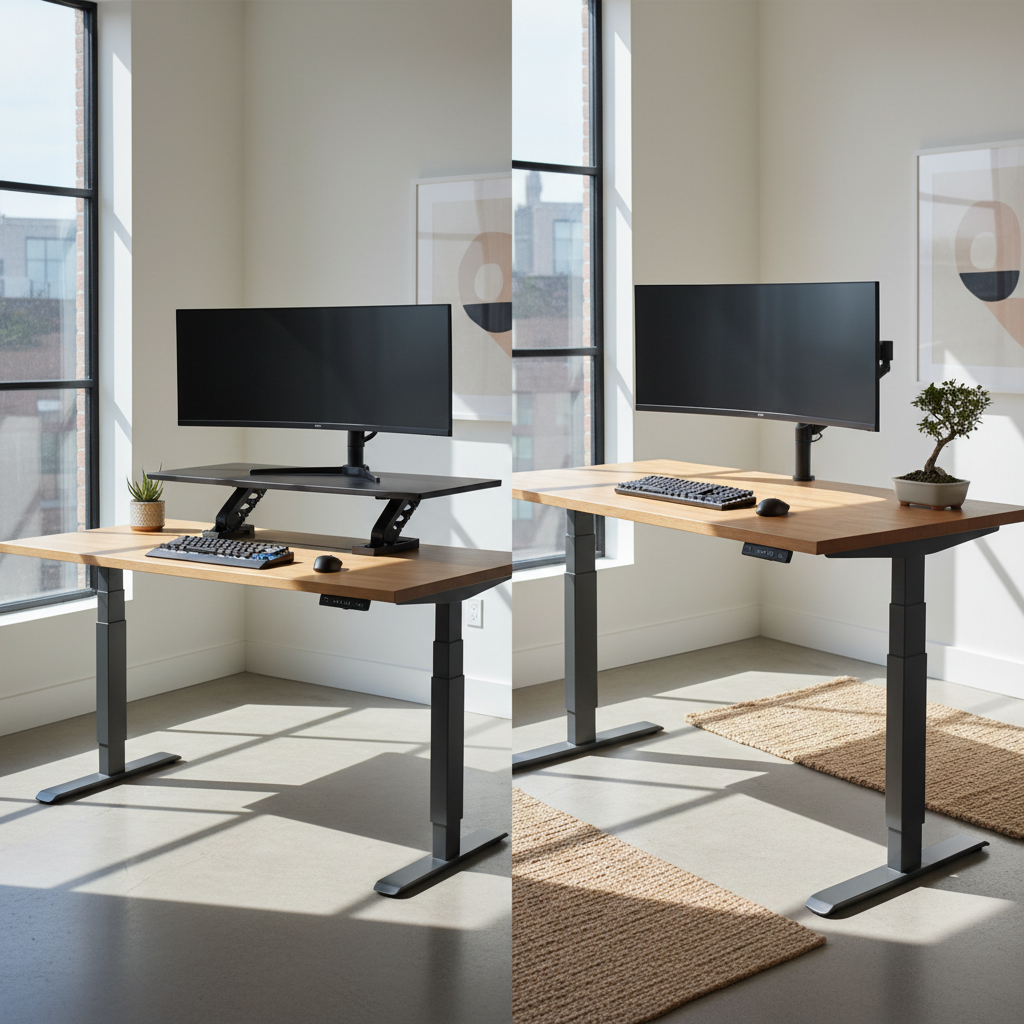
Choosing between a standing desk converter and a standing desk can be confusing. Both options help you alternate between sitting and standing. But they serve very different needs. This guide breaks down every detail. You will know exactly which option fits your workspace, budget, and health goals by the end.
Standing Desk Converter vs Standing Desk: Quick Answer Summary
Short on time? Here is the fast answer. A standing desk converter sits on top of your existing desk. A standing desk replaces your entire desk. Each option has clear advantages depending on your situation.
Standing Desk Converter Best For
- Renters who move frequently
- People on a tight budget (starts at $199)
- Users who want a quick setup (5 minutes or less)
- Workspaces with limited room for furniture changes
- First-time sit-stand users who want to test the habit
Standing Desk Best For
- Home office workers who want a permanent setup
- Users with multiple monitors (2–3 screens)
- People who value maximum stability and zero wobble
- Those willing to invest $500–$2,000+ for long-term ergonomics
- Users who need a large, clean desktop surface
At-a-Glance Comparison Table
| Feature | Standing Desk Converter | Standing Desk |
|---|---|---|
| Price Range | $199–$1,000 | $300–$2,000+ |
| Setup Time | 5 minutes | 30–60 minutes |
| Weight Capacity | 30–80 lbs | 150–400 lbs |
| Surface Area | 20–36 inches wide | 48–80 inches wide |
| Portability | High | Low |
| Warranty | 1–3 years | 2–5 years |
| Stability | Moderate (some wobble) | Excellent |
Standing Desk Converter vs Standing Desk: Fundamental Differences
Understanding the core difference is simple. One adds to your desk. The other replaces it. But the details matter.
What Is a Standing Desk Converter?
A standing desk converter is a height-adjustable platform. You place it on top of your existing desk. It lifts your monitor, keyboard, and mouse to standing height. Most models use a gas spring or electric motor. You can switch between sitting and standing in seconds. The desk below stays untouched. This makes converters ideal for renters and shared workspaces.
What Is a Full Standing Desk?
A full standing desk is a complete desk unit. It has its own frame, legs, and desktop surface. The entire desk moves up and down. Electric models use one, two, or three motors. Manual models use a crank handle. Full standing desks offer a large, unified workspace. They replace your old desk entirely.
How Standing Desk Converter vs Standing Desk Actually Work
A standing desk converter works by elevating your equipment. The base sits on your current desk. A rising platform lifts your monitor and keyboard. Gas spring models use manual force. Electric converters use a motor. The underlying desk surface remains at sitting height.
A full standing desk works differently. The entire desktop moves. The frame adjusts the height of the whole surface. Your monitor, keyboard, mouse, and all accessories move together. This creates a seamless transition. There is no stacked equipment. Everything sits at one consistent level.
Standing Desk Converter vs Standing Desk: Cost Comparison
Cost is often the first factor people consider. But the real picture is more complex than the sticker price.
Upfront Cost: Standing Desk Converter vs Standing Desk Price Breakdown
| Category | Standing Desk Converter | Standing Desk |
|---|---|---|
| Budget | $199–$350 | $300–$500 |
| Mid-Range | $350–$650 | $500–$900 |
| Premium | $650–$1,000+ | $900–$2,000+ |
Popular standing desk converter options include the FlexiSpot DCX760 (~$308), the VariDesk Pro Plus 36 ($429), and the Ergotron WorkFit-S ($742). Popular full standing desk options include the Branch Standing Desk (~$600), the Vari Electric Desk (~$700), and the ErgoImpact Triple-Motor ($1,200+).
Important note: High-end standing desk converter models now cost nearly as much as entry-level electric standing desks. The price gap is narrowing fast.
Long-Term Value and Durability (5-Year TCO Analysis)
Total cost of ownership (TCO) tells the full story. Here is a 5-year comparison:
| Factor | Standing Desk Converter | Standing Desk |
|---|---|---|
| Average Purchase Price | $450 | $750 |
| Replacement Needed? | Possible (2–4 year lifespan on budget models) | Unlikely (5+ year lifespan) |
| Desk Still Needed | Yes (add existing desk cost) | No (desk is included) |
| 5-Year Estimated TCO | $450–$900 (may need replacement) | $750 (one-time purchase) |
Is the Standing Desk Converter vs Standing Desk Investment Worth It?
Yes, both are worth it. Studies show sit-stand desks reduce back pain by up to 54%. They also boost energy and focus. The question is not whether to invest. The question is which type gives you the best return. A standing desk converter offers a low-risk test. A full standing desk provides a long-term ergonomic solution.
Ergonomics and Health: Standing Desk Converter vs Standing Desk
Both options improve your posture. But they differ in how they support your body.
Posture Support: Standing Desk Converter vs Standing Desk
A full standing desk provides superior posture support. The entire surface is at one height. Your monitor, keyboard, and mouse align perfectly. Your elbows stay at 90 degrees. Your screen stays at eye level.
A standing desk converter can work well too. But it has limitations. The keyboard tray sits lower than the monitor platform. This is by design. However, the limited surface area can cause you to crowd your equipment. This may lead to awkward arm positions over long sessions.
Ideal for Back Pain, Wrist Issues, and Shoulder Problems
For back pain: A full standing desk wins. The stable, large surface lets you position everything correctly. You can use a full-sized ergonomic keyboard and monitor arm. A standing desk converter can also help. But the smaller surface may limit optimal placement.
For wrist issues: Both work. Full standing desks offer more room for ergonomic keyboards and wrist rests. Standing desk converters with dedicated keyboard trays also support neutral wrist angles.
For shoulder problems: A full standing desk allows monitor arms at precise heights. A standing desk converter may not accommodate heavy monitor arms due to weight limits (30–80 lbs).
Expert Ergonomist Recommendation
Most certified ergonomists recommend a full standing desk for users who sit more than 6 hours per day. For users under 4 hours, a standing desk converter works well. The key rule: your elbows must be at 90 degrees. Your monitor top must be at or slightly below eye level. Both options can achieve this. But a full standing desk makes it easier and more stable.
Space and Setup: Standing Desk Converter vs Standing Desk
Desk Space and Footprint Comparison
A standing desk converter uses space on top of your existing desk. Typical dimensions are 28–36 inches wide and 16–20 inches deep. It leaves the rest of your desk available for other items.
A full standing desk needs floor space. Typical dimensions are 48–80 inches wide and 24–30 inches deep. You need room to remove your old desk and place the new one.
Setup Time: Standing Desk Converter (5 Minutes) vs Standing Desk (Installation Required)
A standing desk converter is simple. Most models arrive fully assembled or with minimal assembly. You place it on your desk. You plug in the power cord if it is electric. Done. Setup takes under 5 minutes.
A full standing desk requires real work. You must assemble the frame. Attach the legs. Mount the desktop. Route the cables. Most users need 30 to 60 minutes. Some models require two people for safe installation.
Cable Management: Standing Desk Converter vs Standing Desk Challenges
Cable management is harder with a full standing desk. As the desk moves up and down, cables stretch and compress. You need a cable management tray, flexible cable sleeves, and proper slack. Budget models often lack built-in cable management.
A standing desk converter is easier. The cables sit on top of your desk. They do not stretch as much. But you still need to manage the converter’s power cord and any keyboard/mouse cables.
Desk Compatibility (L-Shaped, Corner, Glass Desks)
A standing desk converter works on almost any existing desk. L-shaped desks, corner desks, and glass desks all work. The converter simply sits on top. No modifications needed.
A full standing desk replaces your current desk. If you have an L-shaped desk, you need an L-shaped standing desk (which costs more). Glass desks are not suitable as the base for a standing desk converter due to weight concentration risks. Check your desk’s weight rating first.
Usability: Standing Desk Converter vs Standing Desk Daily Experience
Transition Speed: Sitting to Standing in Seconds
Electric standing desk converter models switch in 3–5 seconds. Manual gas spring models take 5–10 seconds. You press a button or squeeze a lever. The platform rises.
Electric full standing desks switch in 5–10 seconds. Dual-motor models are faster than single-motor models. You press a memory preset button. The desk glides to your saved height. Manual crank desks take 30–60 seconds to adjust.
Stability and Wobble: Standing Desk Converter vs Standing Desk
This is where the difference is most noticeable. A full standing desk is far more stable. The frame is bolted to the floor. The desktop is wide and heavy. Wobble is minimal, even at full height.
A standing desk converter sits on top of another desk. At full height, it can wobble. Typing and mouse use may cause slight screen movement. Budget models wobble more. Premium models (like the Ergotron WorkFit-S) reduce this significantly. But no converter matches the stability of a full standing desk.
Monitor Support and Weight Capacity (Dual/Triple Setups)
| Setup | Standing Desk Converter | Standing Desk |
|---|---|---|
| Single Monitor + Laptop | Works well | Works well |
| Dual Monitors (24–27″) | Tight but possible | Comfortable |
| Triple Monitor Setup | Not recommended | Comfortable |
| Max Weight | 30–80 lbs | 150–400 lbs |
If you use dual or triple monitors, a full standing desk is the clear choice. A standing desk converter simply cannot support that much weight safely.
Noise Levels and Workspace Disruption
Electric standing desk converter motors produce 40–50 dB of noise. This is similar to a quiet conversation. It will not disturb coworkers in most offices.
Electric full standing desks produce 45–55 dB. Dual-motor models may be slightly louder. Both are quiet enough for shared offices. Manual models (gas spring or crank) produce zero noise.
Aesthetics: Standing Desk Converter vs Standing Desk in Home Office Design
Visual Appeal and Minimalist Setups
A full standing desk creates a cleaner, more minimalist look. One desk. One surface. No stacked layers. The cables can be hidden inside the frame. The result is a professional, organized workspace.
A standing desk converter adds visible layers. The converter sits on top of your desk. Power cords and cables are visible. It looks functional but not as sleek. For minimalist home office designs, a full standing desk wins.
Standing Desk Converter vs Standing Desk for Small Spaces
In small spaces, a standing desk converter often works better. It does not require removing your existing desk. It fits on almost any surface. You maintain your current desk’s storage drawers and shelf space.
A full standing desk needs its own dedicated floor area. In a small apartment or bedroom office, this may not be practical. However, compact standing desks (48″ wide) are available for tight spaces.
Long-Term Workspace Evolution
Your workspace will change over time. You may add monitors. Upgrade your chair. Change rooms. A full standing desk grows with you. It provides a permanent, scalable foundation. A standing desk converter may need replacement as your needs expand.
The Hybrid Approach: Start with Standing Desk Converter, Upgrade to Standing Desk Later
This is a smart strategy many experts recommend. Buy a budget standing desk converter first ($200–$350). Use it for 3–6 months. Test the sit-stand habit. See if it works for your body and workflow.
If you love standing, upgrade to a full standing desk later. Keep the converter as a backup or use it in a second location. This approach minimizes risk. You avoid spending $750+ on a full desk only to discover you prefer sitting all day.
Standing Desk Converter vs Standing Desk: Which Should I Choose Based on My Situation?
For Renters and Frequent Movers
Choose a standing desk converter. It is portable. You can take it with you. It fits on any desk in your new apartment. No need to buy a new desk every time you move.
Best Standing Desk Converters for Renters →
For Budget-Conscious Home Office Workers
If your budget is under $350, a standing desk converter is your best option. Models like the FlexiSpot DCX760 offer solid quality at ~$308. You get sit-stand functionality without the full desk price.
Top Budget Standing Desk Converters Under $350 →
For Multi-Monitor Professional Setups
Choose a full standing desk. With dual or triple monitors, you need the weight capacity (150–400 lbs) and surface area of a full desk. A standing desk converter cannot safely support this setup.
Best Full Standing Desks for Multi-Monitor Setups →
For First-Time Sit-Stand Users
Start with a standing desk converter. It is low risk. You can test the habit without a large investment. If you decide standing is not for you, you spent $200–$350 instead of $750+.
Best Starter Standing Desk Converters →
For Long-Term Ergonomic Health Investment
Invest in a full standing desk. It offers better stability, larger workspace, longer warranty (5+ years), and a more ergonomic setup. Over 5 years, the total cost is often lower than replacing a converter.
Best Full Standing Desks for Long-Term Use →
Expert Tips: Maximizing Your Standing Desk Converter vs Standing Desk Experience
How Often Should You Stand at Your Desk?
Experts recommend a 1:1 ratio. Sit for 30 minutes. Stand for 30 minutes. Repeat. Cornell University’s Ergonomics Web suggests the 20-8-2 rule: 20 minutes sitting, 8 minutes standing, 2 minutes moving every 30 minutes. Aim for 2–4 hours of total standing per 8-hour workday. Start with 15 minutes per hour. Increase gradually over 1–2 weeks.
Proper Height Settings for Standing Desk Converter vs Standing Desk
| Position | Elbow Angle | Screen Height | Feet Position |
|---|---|---|---|
| Sitting | 90 degrees | Top of screen at eye level | Flat on the floor |
| Standing | 90 degrees | Top of screen at eye level | Flat on the floor or anti-fatigue mat |
Save both heights in your desk’s memory presets. This makes transitions instant. On a standing desk converter, make sure the keyboard tray and monitor platform are both at the correct heights.
Common Mistakes to Avoid
- Standing too long. Do not stand for more than 30–60 minutes at a time. This causes joint strain and fatigue.
- Ignoring pain signals. If your feet, legs, or back ache, sit down. Pain is a signal, not a challenge.
- Shifting weight to one leg. Keep both feet flat. This prevents hip and knee stress.
- Wrong monitor height. If you look up or down at your screen, readjust. Your neck will thank you.
- Standing all day on day one. Start with 15–20 minutes. Build up slowly.
- Skipping an anti-fatigue mat. This $30–$50 accessory reduces foot and leg strain significantly.
FAQ: Common Questions About Standing Desk Converter vs Standing Desk
Can a Standing Desk Converter Replace a Standing Desk?
For basic use, yes. A standing desk converter provides the same sit-stand benefit. But it cannot match the stability, weight capacity, or surface area of a full standing desk. For a single monitor setup, a converter works well. For multi-monitor or heavy equipment setups, a full standing desk is better.
Is a Standing Desk Converter Better Than a Standing Desk for Small Desks?
Yes. A standing desk converter is designed for small spaces. It sits on your existing desk. It does not require removing furniture. If your room cannot fit a 60-inch standing desk, a 30-inch converter is the obvious choice.
How Long Do Standing Desk Converters vs Standing Desks Last?
Budget standing desk converter models last 2–4 years. Mid-range models last 3–5 years. Premium models (like the Ergotron WorkFit-S) last 5–7 years. Full standing desks last 5–10 years. Electric motor models typically have a motor lifespan of 10,000+ cycles. Frame durability is often 10+ years.
Will Insurance Cover a Standing Desk Converter vs Standing Desk?
Sometimes. If a doctor prescribes a sit-stand desk for a medical condition (chronic back pain, circulatory issues), some health insurance plans cover part of the cost. You need a letter of medical necessity. Check with your provider. Both standing desk converter and standing desk purchases may qualify. FSA and HSA funds may also apply.
Final Verdict: Standing Desk Converter vs Standing Desk in 2026
Both options are excellent. The right choice depends on your situation.
Choose a standing desk converter if: you rent, have a tight budget, need portability, want a quick setup, or are testing the sit-stand habit.
Choose a full standing desk if: you own your home office, use multiple monitors, need maximum stability, want a clean aesthetic, or plan to keep your desk for 5+ years.
The hybrid approach is also smart. Start with a standing desk converter. Upgrade to a full standing desk later once you are committed to the habit.
No matter which option you choose, you are investing in your health. Studies confirm that alternating between sitting and standing reduces back pain, boosts energy, and improves focus. The best desk is the one you actually use.
Ready to make your move? Browse the best standing desk converters of 2026 → | Browse the best full standing desks of 2026 →