

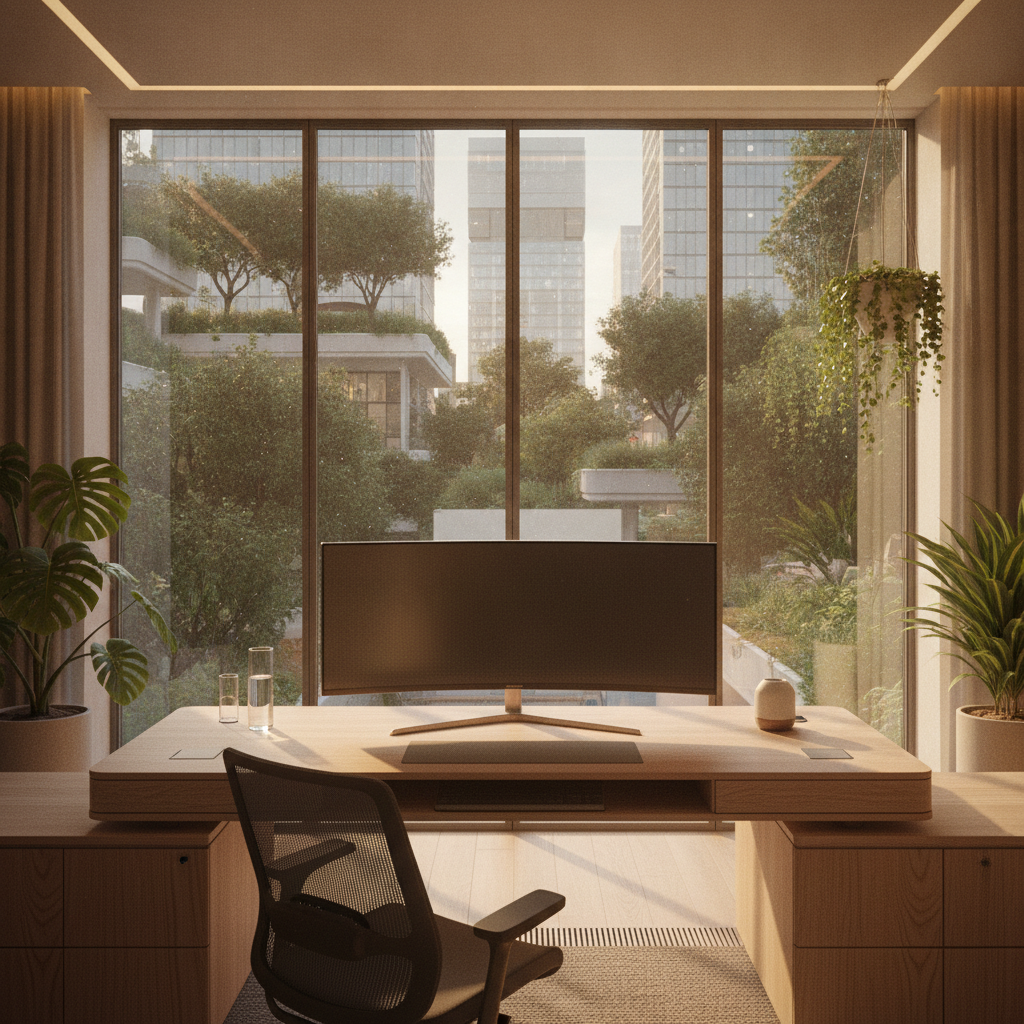
Setting up a home office layout with window behind monitor is one of the most common challenges people face. The bright light from the window can cause screen glare, eye strain, and make video calls look dark. But with the right approach, you can make this layout work well for your daily tasks. This guide will walk you through every step to create a comfortable and productive workspace.
Understanding the Window Behind Monitor Challenge
Why Window Placement Matters for Your Home Office
Window placement affects everything in your home office. Light from a window behind your monitor hits the back of your screen. This creates a bright background that makes your screen hard to see. Your eyes must work harder to focus on the screen content. Over time, this causes eye fatigue, headaches, and reduced productivity. Good window management is the key to a successful home office layout with window behind monitor.
Common Problems With Window Behind Monitor Setup
When you set up a home office layout with window behind monitor, you will likely face these issues:
- Screen glare that makes text hard to read
- Eye strain from the bright contrast between window and screen
- Dark face on video calls because the window light comes from behind you
- Screen appears dim or washed out during sunny hours
- Heat from direct sunlight can affect your equipment
- Difficulty adjusting monitor brightness to match the bright background
When This Layout Actually Works (Assessment Checklist)
Before you start, check if your space can support a home office layout with window behind monitor:
- Does the window face north? North-facing windows have softer light.
- Can you install blinds or curtains on the window?
- Is your monitor bright enough (300+ nits) to handle the backlight?
- Do you have space for a monitor arm to adjust angles?
- Can you add task lighting in front of you?
If you answered yes to most of these, your home office layout with window behind monitor can work well.
Step-by-Step: Optimizing Your Home Office Layout With Window Behind Monitor
Step 1 – Assess Your Window Orientation and Sun Path
First, understand how sunlight moves through your window during the day. Watch the window at different times: morning, noon, and afternoon. Note when direct sunlight hits your desk area. South-facing windows get the most direct light. East-facing windows have strong morning light. West-facing windows have strong afternoon light. North-facing windows have the softest, most even light. This information helps you plan your home office layout with window behind monitor.
Step 2 – Position Your Desk and Monitor Correctly
Place your desk so the monitor sits between you and the window. Keep the monitor at arm’s length from your eyes. The top of the screen should be at or slightly below eye level. If possible, leave a small gap between the monitor edge and the window frame. This gap helps reduce the harsh contrast. For the best home office layout with window behind monitor, angle the monitor slightly downward to block some window light.
Step 3 – Adjust Monitor Height and Angle
Use a monitor arm or stand to fine-tune your screen position. Tilt the monitor down by 10 to 20 degrees. This angle helps block direct window light from hitting the screen surface. Raise or lower the monitor until the window light reflects above your viewing area. Make small adjustments and test for a few minutes each time. The goal is to find the sweet spot where you can see the screen clearly without window glare.
Step 4 – Set Up Your Lighting Hierarchy
Good lighting has three layers for a home office layout with window behind monitor:
- Ambient light: General room lighting that reduces the contrast between the bright window and dark room.
- Task light: A desk lamp that lights your work area without creating screen reflections.
- Accent light: Small lights like LED strips behind the monitor to balance brightness.
Start with ambient light, then add task light, then add accent light. Test each layer before adding the next.
Best Window Treatments for Home Office Layout With Window Behind Monitor
Blackout Blinds vs. Light-Filtering Shades
Blackout blinds block nearly all light. They work best when you need total screen control, like for video editing or gaming. Light-filtering shades soften the light while still letting some natural brightness into the room. For most home office layout with window behind monitor setups, light-filtering shades are the better choice. They reduce glare while keeping the room feeling open and bright.
Adjustable Slatted Blinds for Glare Control
Venetian blinds or vertical blinds give you precise control over light direction. Turn the slats upward to bounce light toward the ceiling. This creates soft, indirect light in the room. Turn the slats downward to block direct light while still allowing some brightness. For a home office layout with window behind monitor, adjustable slatted blinds offer the best balance of light control and natural brightness.
Smart Blinds and Automated Solutions
Smart blinds can adjust automatically based on the time of day or sunlight intensity. They connect to your phone or smart home system. Some models use light sensors to change slat positions throughout the day. While expensive, they remove the need for manual adjustments. If you work long hours, smart blinds make your home office layout with window behind monitor much easier to manage.
Budget-Friendly Curtain Options
Not everyone wants to spend much on window treatments. Simple solutions include:
- Sheer curtains that diffuse harsh sunlight
- Double curtain rods with sheer and blackout layers
- Tension rod curtains for rental-friendly installation
- DIY fabric panels attached with velcro strips
Even basic curtains can make a big difference in your home office layout with window behind monitor.
Monitor Setup Solutions for Window Behind Monitor Layout
Anti-Glare Screen Protectors and Filters
Anti-glare screen protectors add a matte layer over your screen. This layer scatters reflected light, reducing harsh glare spots. They are easy to install and work with any monitor. For a home office layout with window behind monitor, an anti-glare filter is one of the cheapest and most effective solutions. Look for filters that match your monitor size exactly.
Monitor Hoods and Shades
Monitor hoods wrap around the top and sides of your screen. They block light coming from above and the sides. Professional photo and video editors use them often. For a home office layout with window behind monitor, a hood can significantly reduce overhead and side glare. You can buy ready-made hoods or make one from foam board.
Monitor Light Bars for Balanced Illumination
Monitor light bars sit on top of your screen and shine light downward onto your desk. They illuminate your work area without reflecting on the screen. Many models have sensors that adjust brightness based on ambient light. A monitor light bar helps balance the bright window behind your screen. This makes your home office layout with window behind monitor much more comfortable.
Bias Lighting Behind Your Monitor
Bias lighting means placing LED strips behind your monitor. The light shines on the wall behind the screen. This reduces the contrast between the bright window and the dark wall. Your eyes feel less strain because the brightness transition is smoother. Use warm white LEDs (around 6500K) to match your screen color temperature. Bias lighting is a simple upgrade for any home office layout with window behind monitor.
Matte vs. Glossy Screen Considerations
Matte screens have an anti-reflective coating that reduces glare. Glossy screens look more vivid but reflect more light. If you have a home office layout with window behind monitor, a matte screen is usually the better choice. If you already have a glossy screen, an anti-glare filter can help. Some newer monitors offer a middle ground with semi-matte coatings.
Lighting Setup for Home Office With Window Behind Monitor
Ambient Lighting to Reduce Contrast
The biggest problem with a home office layout with window behind monitor is the contrast between the bright window and darker room areas. Ambient lighting fills the room with soft, even light. Use ceiling lights, floor lamps, or wall sconces to create this base layer. The goal is to bring the room brightness closer to the window brightness. This reduces eye strain significantly.
Task Lighting Placement Guide
Task lighting focuses light where you need it most. For a home office layout with window behind monitor, place your task light to the side of your monitor, not behind it. Position the lamp so it lights your keyboard and documents without shining on the screen. An adjustable arm lamp gives you the most flexibility. Keep the lamp shade below eye level to avoid direct glare.
Daylight vs. Artificial Light Balance
During the day, your window provides most of the light. As the sun sets, you need more artificial light. Set up your lights on dimmers so you can adjust brightness throughout the day. On bright days, use less artificial light. On cloudy days or evenings, increase it. The key is to keep the overall room brightness consistent. This balance is essential for a comfortable home office layout with window behind monitor.
Smart Lighting Solutions for Different Times of Day
Smart bulbs let you change color temperature and brightness with your phone. Use cool white light (5000K-6500K) during the day to match natural daylight. Switch to warm white light (2700K-3000K) in the evening to help your body prepare for sleep. Some smart systems can change automatically based on the time. This makes managing your home office layout with window behind monitor effortless.
Video Call Optimization With Window Behind Monitor
Camera Positioning to Avoid Backlighting
When the window is behind your monitor, it is also behind you during video calls. This makes your face look dark. Move your camera as close to the monitor as possible. Raise the camera to eye level. The closer the camera is to the screen center, the less the window affects your appearance. For a home office layout with window behind monitor, camera placement is critical for good video calls.
Ring Lights and Front-Facing Solutions
A ring light sits around your camera and lights your face evenly. This cancels out the backlighting effect from the window. Place the ring light close to your camera, about arm’s length from your face. Set the brightness to match the room light level. Ring lights are the most effective solution for video calls in a home office layout with window behind monitor.
Background Lighting for Professional Appearance
Light the area behind you to create a clean video call background. Use small LED panels or accent lights on shelves. This separates you from the background and makes you look more professional. Avoid having the window visible directly behind your head. If you cannot move the window out of frame, use a virtual background or blur effect.
Quick Setup Checklist for Video Meetings
Before important video calls in your home office layout with window behind monitor:
- Close or adjust blinds to reduce window brightness
- Turn on your ring light or front-facing lamp
- Turn on ambient room lights
- Check your camera preview to see how you look
- Adjust light brightness until your face is clearly visible
- Make sure no harsh shadows appear on your face
Seasonal Adjustments for Your Home Office Layout
Summer Sun Angle Solutions
In summer, the sun sits higher in the sky. Direct sunlight may come through the window at a steeper angle. Use overhead blinds or awnings to block high-angle sun. Tilt your monitor further downward to avoid reflections. Consider adding a small visor above your monitor. These adjustments keep your home office layout with window behind monitor comfortable during hot months.
Winter Lighting Challenges
In winter, the sun sits lower in the sky. Sunlight may shine deeper into your room and hit your screen more directly. You may need to close blinds more often. Add more ambient lighting to compensate for shorter, darker days. A daylight lamp can help you get bright light during winter afternoons. These changes help your home office layout with window behind monitor work year-round.
Time-of-Day Troubleshooting Guide
| Time of Day | Common Issue | Quick Fix |
|---|---|---|
| Morning (8-10 AM) | East window glare | Close blinds halfway, turn on ambient light |
| Midday (11 AM-2 PM) | Bright overall light | Use light-filtering shades, adjust monitor brightness up |
| Afternoon (3-5 PM) | West window glare | Close blinds, turn on desk lamp |
| Evening (after 6 PM) | Dark room, bright screen | Turn on all room lights, use bias lighting |
Creating a Flexible Setup for Year-Round Comfort
The best home office layout with window behind monitor adapts to changing conditions. Use adjustable equipment like monitor arms, dimmable lights, and adjustable blinds. Keep a few backup solutions handy, like a clip-on monitor hood or portable lamp. Test your setup monthly and make small changes as needed. Flexibility is the key to long-term comfort.
Small Room Solutions for Home Office Layout With Window Behind Monitor
Space-Saving Desk Configurations
In small rooms, every inch matters. Use a narrow desk that fits snugly against the window wall. A wall-mounted fold-down desk saves space when not in use. Corner desks can position the monitor at an angle to the window, reducing direct backlight. For a home office layout with window behind monitor in a small room, choose compact furniture that maximizes floor space.
Multi-Functional Furniture Options
Look for furniture that serves multiple purposes. A desk with built-in storage reduces clutter. An ottoman that opens for storage keeps your room tidy. A monitor arm clears desk space by lifting the screen off the surface. These multi-functional pieces make a small home office layout with window behind monitor more practical and organized.
Rental-Friendly Modifications
If you rent your home, you cannot make permanent changes. Use tension rods for curtains instead of drilling holes. Apply removable wallpaper or fabric panels to walls. Use command strips to hang lightweight shelves or decorations. These rental-friendly options let you improve your home office layout with window behind monitor without losing your security deposit.
Apartment and Studio Layout Ideas
In studio apartments, your office may share space with your living area. Use a room divider or bookshelf to separate the workspace. Position the desk so the window is behind the monitor but the back of the desk faces the living area. This creates a natural boundary. Add a rug under the desk to define the office zone. These tricks make a studio home office layout with window behind monitor feel more organized.
Budget vs. Premium Solutions for Window Behind Monitor Setup
Free Solutions You Can Implement Today
You do not need to spend money to improve your home office layout with window behind monitor. Try these free solutions first:
- Rearrange your desk to a slightly different angle
- Adjust monitor height and tilt using books or boxes
- Use existing household lamps for task lighting
- Close blinds during peak sun hours
- Change your monitor’s brightness and contrast settings
- Move your chair closer to or farther from the desk
Under $50 Quick Fixes
Small investments can make a big difference:
- Anti-glare screen protector ($10-20)
- LED strip bias lighting ($15-25)
- Basic desk lamp with adjustable arm ($20-35)
- Tension rod with curtain panel ($25-40)
- Monitor stand with height adjustment ($20-40)
Mid-Range Investments ($50-$200)
For better results, consider these mid-range options:
- Quality monitor arm ($60-120)
- Monitor light bar ($40-80)
- Ring light for video calls ($50-100)
- Light-filtering roller shades ($70-150)
- Adjustable desk lamp with color temperature control ($60-120)
Premium Setup Options ($200+)
If budget is not a concern, these premium options provide the best experience:
- Motorized smart blinds ($200-500)
- Full monitor hood system ($100-250)
- Smart lighting system with multiple zones ($200-400)
- Standing desk with memory presets ($300-800)
- Professional video call lighting kit ($200-350)
Troubleshooting Common Issues With Window Behind Monitor
Screen Appears Washed Out or Dim
If your screen looks faded, the window light is too bright compared to the screen. First, increase your monitor brightness to 80-100%. Next, reduce window light by closing blinds partially. Add bias lighting behind the monitor to reduce contrast. If the problem continues, consider an anti-glare screen protector. These steps usually fix the washed-out look in a home office layout with window behind monitor.
Eye Strain and Fatigue Solutions
Eye strain means your eyes work too hard. To fix this in your home office layout with window behind monitor:
- Follow the 20-20-20 rule: every 20 minutes, look at something 20 feet away for 20 seconds
- Reduce screen brightness to match room light
- Add ambient lighting to reduce contrast
- Use artificial tears if your eyes feel dry
- Adjust monitor distance to arm’s length
- Make sure your monitor is at the correct height
Glare at Specific Times of Day
If glare only happens at certain times, you have a sun angle problem. Track when the glare occurs. During those times, close blinds or adjust slats to block direct light. You can also shift your work schedule to avoid peak glare hours. For a permanent fix, consider adjustable blinds that you can change throughout the day. This targeted approach makes your home office layout with window behind monitor more manageable.
When to Consider Relocating Your Desk
Sometimes, no amount of adjustment fixes the problem. Consider moving your desk if:
- You have tried all solutions for at least two weeks with no improvement
- You experience constant headaches or eye pain
- Your work requires perfect color accuracy
- The window receives direct sunlight for more than 6 hours daily
- You cannot install any window treatments
In these cases, moving the desk to a perpendicular wall or facing the window may be the best solution for your home office layout with window behind monitor.
FAQ: Home Office Layout With Window Behind Monitor
Is It Bad to Have a Window Behind Your Monitor?
It is not ideal, but it is not terrible either. A home office layout with window behind monitor creates challenges like glare and contrast issues. However, with proper window treatments, monitor adjustments, and lighting setup, you can make it work well. Many people use this layout successfully by following the steps in this guide.
How Do I Reduce Glare Without Moving My Desk?
You have several options to reduce glare without moving your desk:
- Install blinds or curtains to control window light
- Add an anti-glare screen protector
- Adjust monitor tilt to angle away from window light
- Use a monitor hood to block overhead light
- Increase monitor brightness to overcome the glare
- Add bias lighting behind the monitor
What Monitor Settings Help With Window Behind Monitor?
Adjust these monitor settings for a better home office layout with window behind monitor:
- Increase brightness to 80-100% during daytime
- Increase contrast slightly to make text clearer
- Enable blue light filter for evening use
- Switch to dark mode on your computer to reduce overall screen brightness
- Adjust color temperature to match room lighting
Can I Use a Window Behind Monitor Setup for Gaming?
Yes, you can game with a home office layout with window behind monitor, but you need extra steps. Use blackout blinds to completely block window light during gaming sessions. Add bias lighting to reduce eye strain during long sessions. Make sure your monitor has a high refresh rate and low response time. A matte screen finish helps reduce reflections during fast-moving game scenes.
How Do I Fix Video Call Lighting With Window Behind Me?
To fix video call lighting in a home office layout with window behind monitor:
- Add a ring light or front-facing lamp to light your face
- Close blinds partially to reduce the bright background
- Turn on room lights to balance the overall brightness
- Position the camera as close to the monitor as possible
- Use the video call software’s background blur feature if needed
Conclusion: Making Your Home Office Layout With Window Behind Monitor Work
A home office layout with window behind monitor presents real challenges, but it is far from impossible to manage. The key is controlling light at every level: window light, ambient room light, task light, and screen light. Start with the free solutions like adjusting your monitor angle and using existing blinds. Then add affordable upgrades like bias lighting or an anti-glare screen protector. If needed, invest in premium solutions like smart blinds or a monitor arm.
Remember these key points for your home office layout with window behind monitor:
- Control window light with blinds, curtains, or shades
- Balance room brightness with ambient and task lighting
- Adjust monitor height, angle, and brightness settings
- Add front lighting for video calls
- Make seasonal and time-of-day adjustments
- Take regular breaks to reduce eye strain
Your next step is to assess your current setup using the checklist in this guide. Pick one or two improvements to implement this week. Small changes often make the biggest difference. With patience and the right tools, your home office layout with window behind monitor can become a comfortable, productive space that you enjoy using every day.